Now Playing LCD for my internet stream
This is not really a PIC project but it is connected to my Medium Wave Mayhem modulator. I use Radio Génération Soul Disco Funk, now also known as Radio Goodlife, as its source. Now its display nicely shows the frequency but not what is playing on the stream. Which I get from an aging Raspberry Pi 3B. It runs a shell script where ffmpeg is getting the stream and filtering it and then sending it to VLC (actually cvlc which is the command line version) which outputs it as audio. The play-generationsouldiscofunk.sh script is very simple:
ffmpeg
-hide_banner -i https://gestream.fr/g-radio-hd.mp3 -af "highpass=80,
lowpass=f=4500, lowpass=f=4500, lowpass=f=4500:t=h:w=3333, acompressor=threshold=-10dB:ratio=9:attack=200:release=1000,
volume=2dB" -f wav - | cvlc --avcodec-codec=wav -
It uses a brick wall low pass filter for 4.5 kHz as per requirements for medium wave, some highpass filtering to remove excess bass, some compressing to get a fuller "AM" sound and then pipes the result to cvlc which plays the stream via the 3.5mm socket to my modulator. The play-generationsouldiscofunk.sh script runs from crontab with the @reboot parameter after a 10 s delay to allow network to come up. Otherwise the stream will fail to play.
Now I happen to have two identical LCD screens of 2x16 characters. The second display was connected to the RPi and runs a Python 3 program. It isn't even the first program I wrote but as I am not very good in Python I just looked everything up. The first iterations did not have proper scrolling of long strings. It took quite some effort to solve the loop scrolling. Eventually I came with:
import
time
import RPi.GPIO as GPIO
from RPLCD.gpio import CharLCD
lcd
= CharLCD(pin_rs=18, pin_rw=None, pin_e=19, pins_data=[21, 22, 23, 24],
numbering_mode=GPIO.BOARD)
lcd.clear()
lcd.cursor_mode = 'hide'
lcd.write_string('Starting...')
a_index = 0
t_index = 0
while
True:
f
= open('/tmp/meta_a','r')
a
= f.readline()
f.close()
a_len
= len(a)
f
= open('/tmp/meta_t','r')
t
= f.readline()
f.close()
t_len
= len(t)
if
a_len < 17:
a_msg
= a
else:
a
= a + " "
a_len+=1
if
(a_index + 1) < a_len:
a_index+=1
else:
a_index
= 0
if
(a_index + 16) < a_len:
a_msg
= a[a_index:a_index+16]
if
(a_index + 17) > a_len:
a_msg
= a[a_index:a_len] + a[0:(16 - (a_len - a_index))]
if
t_len < 17:
t_msg
= t
else:
t
= t + " "
t_len+=1
if
(t_index + 1) < t_len:
t_index+=1
else:
t_index
= 0
if
(t_index + 16) < t_len:
t_msg
= t[t_index:t_index+16]
if
(t_index + 17) > t_len:
t_msg
= t[t_index:t_len] + t[0:(16 - (t_len - t_index))]
lcd.clear()
lcd.cursor_pos
= (0, 0)
lcd.write_string(a_msg)
lcd.cursor_pos
= (1, 0)
lcd.write_string(t_msg)
time.sleep(0.3)
I first had installed nowplaying_lcd.py on another RPi 3B and it worked right away. pip complained it did not want to install the required RPLCD library but running inside a virtual environment solved that. It had to be created with python3 -m venv venv where the second venv is in the directory I want to run from, in this case /home/pi/lcd/. Then it installed just fine with ./bin/pip3 install RPLCD. But my program refused to run and attempting to install RPi.GPIO failed. Compile error. Huh? Turned out I had to run sudo apt install python3-dev. I have no idea why it worked on the other 3B. Maybe because it runs Debian Trixie which must have had installed python3-dev and the other still runs Buster, which hadn't, who knows.
The loop scrolling was really tricky to implement. Online I found various solutions but none did the loop scrolling. The problem is that once the string is beyond the LCD length the first part of the string must be extracted and glued at the end while the scrolling index increases every sleep period.
So now I had my display going and I had to get the stream's metadata. VLC can make a webserver with metadata but I could not get that to work. Also, <Ctrl>+<I> has an empty window. After some more querying I discovered that ffmpeg has a metadata option. So I wrote a quick shell script to populate my artist and title variables that my nowplaying script reads:
#!/bin/bash
for (( i=0; i<4; i++ ))
do
ffmpeg -i https://gestream.fr/g-radio-sd.aac -f ffmetadata -|grep StreamTitle=
> /tmp/
cat /tmp/meta | awk -F'StreamTitle=' '{print $2}'>/tmp/meta1
cat /tmp/meta1 | awk -F' - ' '{print $1}'| tr -d '\n'>/tmp/meta_a
cat /tmp/meta1 | awk -F' - ' '{print $2}'| tr -d '\n'>/tmp/meta_t
sleep
13
done
The getmeta.sh shell script queries the stream server and saves the current metadata (StreamTitle) to a temp file. Then it extracts the artist and title and writes them to their respective files (meta_a and meta_t). awk is used to split the StreamTile into because the format is <Artist> - <Title>. It does that four times and then exits and then gets restarted from a cron job running every minute. This way the nowplaying information on my LCD is updated every 15 seconds. There was an issue with the nonprinting newline character that upset my LCD but trimming that solved it.
Now the only thing left is to start everything when the RPi is switched on. This script (startmeta.sh):
#!/bin/bash
echo "Now Playing" > /tmp/meta_a
echo "Waiting..." > /tmp/meta_t
/home/pi/lcd/venv/bin/python3 /home/pi/lcd/venv/nowplaying_lcd.py
exit
preloads the LCD so the nowplaying info will show "Waiting..." until the metadata from the stream is available and then runs the nowplaying program. The last step is to enter the cron jobs:
#
m h dom mon dow command
@reboot sleep 10; /home/pi/bin/play-generationsouldiscofunk.sh > /dev/null
@reboot /home/pi/lcd/venv/startmeta.sh
* * * * * /home/pi/lcd/venv/getmeta.sh
Success!
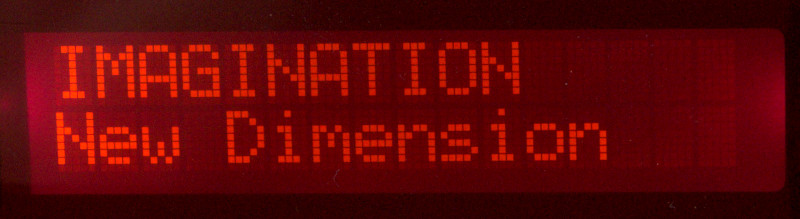
Back to the projects page
Date: 2 August 2026

This software is licensed under the CC-GNU
GPL.